A monitor entry such as CC 102 = 100 does not identify the parameter without the instrument’s MIDI documentation. On a Korg opsix, CC 102 controls operator 1 level. On another synth it may control something else or be unused.
MIDIFabric maps these numbers to names in device definitions: JSON files describing an instrument’s MIDI messages. The monitor uses them to decode messages, and the MIDI Debugger uses the same definitions for decoding and input completion.
Naming a CC
For the opsix, the controllers live in a shared library file that the opsix, opsix SE, opsix module and opsix mk II definitions all import. CC 102 looks like this:
"102": { "name": "OP1 Level", "category": "Operator", "range": [0, 127] }CC 103 to 107 are OP2 to OP6 Level in the same form. The numbers come from Korg’s owner’s manual and MIDI implementation chart. With this definition assigned to the opsix’s port, the monitor shows:
OP1 Level(#102) = 100The name replaces the bare number, and the CC number stays visible in parentheses. A controller can also list value labels. The opsix’s Glide Mode, for example, maps its values to the mode names, so the monitor shows the mode instead of a number. Values without a label stay numeric.
Which definition applies to which port
MIDIFabric decides which definition belongs to a port in this order: a definition you chose yourself, then the device’s own answer to a MIDI identity request, then the port name, and otherwise none. Ports without a definition still show standard names for common controllers, such as Modulation or Sustain.
Four messages, one parameter
Some synths use NRPN for parameters beyond the 128 CCs. One NRPN change is four separate CCs: CC 99 and 98 select the parameter, CC 6 and 38 carry the value. Reading the parameter and value requires combining those four messages.
MIDIFabric groups them. It remembers the parameter selected by CC 99 and 98 for each port and channel, and when CC 6 and 38 arrive it combines them into one value. A definition names the parameter by its two selection numbers. For the Sequential Prophet Rev2:
"0:36": { "name": "VCA Env Release", "range": [0, 127], "category": "Amp Envelope" }So CC 99 = 0, CC 98 = 36, CC 6 = 0, CC 38 = 8 becomes one line:
VCA Env Release = 8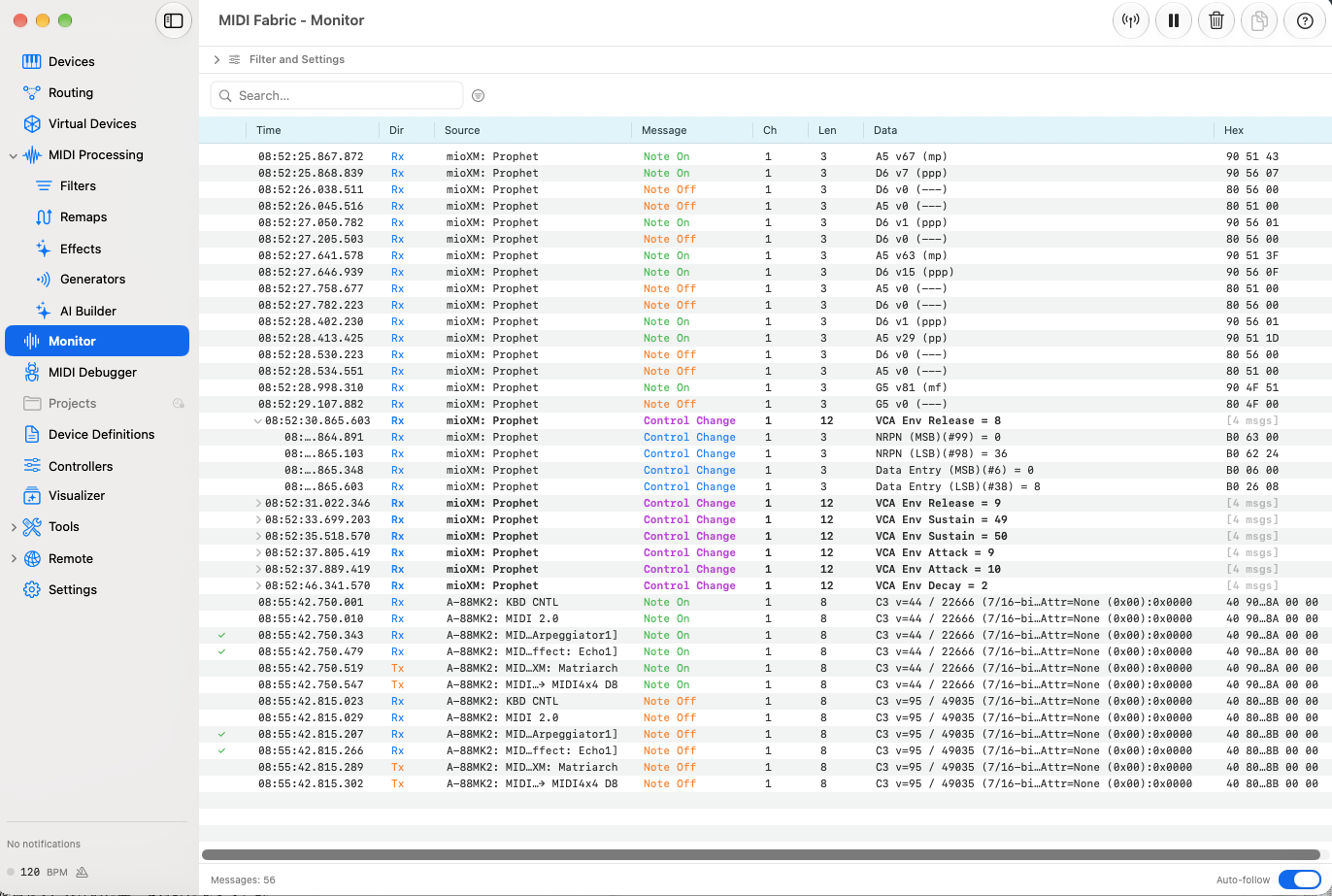
Expanding the line shows the four original messages. The null selection (127/127) clears the parameter, and a selection that is not followed by data within half a second is forgotten, so an unrelated CC 6 later is not attached to it. Messages that MIDIFabric sends are grouped the same way, separately from what it receives.
Editing a definition
You can copy a bundled definition and edit it in the app, or write your own. Your copy takes priority over the bundled one with the same ID, and deleting it brings the bundled one back. Changes saved in the app apply right away; files edited outside the app are read at the next launch. The MIDI Debugger uses the same names when you type messages, as completion suggestions.
MIDIFabric currently bundles 31 device definitions. A validator checks every definition for structure and consistency: IDs, imports, CC and NRPN numbers and ranges, SysEx layouts and manufacturer IDs. It cannot prove that a definition matches the instrument; that comes from the manufacturer’s documents and, where possible, the device itself. For the opsix, the CC numbers have been checked against Korg’s documents, not yet by playing every control on the hardware.
Adding definitions without rebuilding the app
The mapping from the opsix’s CC 102 to “OP1 Level” is stored in its device definition, outside the app’s source code.
So when you fix or add a definition, the monitor’s display and the MIDI Debugger’s completion change without rebuilding the app. If you save the change inside the app, it takes effect right away. Bundled definitions and the ones you write have the same format and are loaded the same way. If your gear has no bundled definition, you can write one, and the app treats it just like the bundled gear.
We plan to publish the device definitions as open source, separately from MIDIFabric. Because they are data kept apart from the app’s code, we design them so that tools other than MIDIFabric can use them too.
Bundled effects and user-created effects also share one format: Lua programs. You can use the bundled templates as starting points and edit their behavior (see Connecting MIDIFabric to AI through MCP).
The same idea extends to SysEx: see Sending and reading JUNO-D SysEx by name.